Crouton: Recipe Manager

Crouton: Recipe Manager

By Crouton LLC

  • Category: Food & Drink
  • Release Date: 2019-09-02
  • Current Version: 2026.4
  • Adult Rating: 4+
  • File Size: 346.24 MB
  • Developer: Crouton LLC
  • Compatibility: Requires iOS 16.1 or later.
Score: 4.81701
4.81701
From 2,869 Ratings

Description

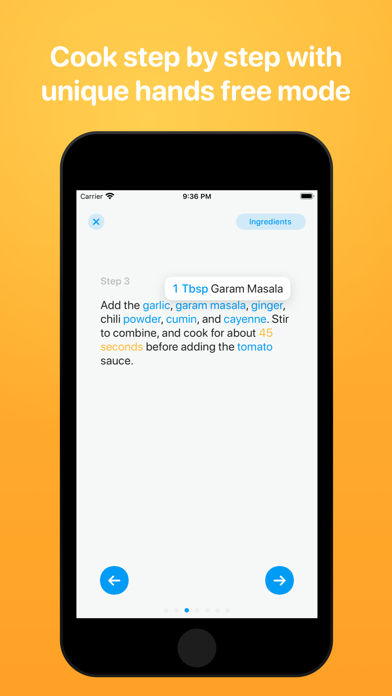
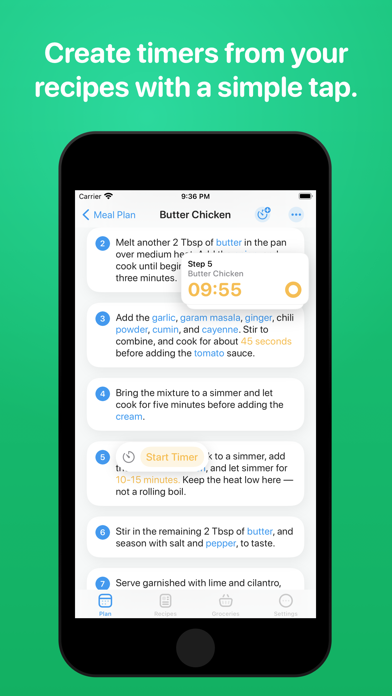
Crouton is simple feature packed recipe organizer & meal planner. The best place to store your favorite recipes from where ever you find them, websites, cookbooks or a handwritten note from your Grandma. IMPORT ANYWHERE Crouton supports importing recipes from almost everywhere! Pull recipes automatically out of websites and just save the bits you need. You can also scan recipes straight out of your recipe book using AI and OCR PLAN YOUR WEEK With your favourite recipes on hand, Crouton makes it very easy to plan your meals for the week (or even long into the future). If you’re stuck for recipe ideas let Crouton automatically generate the meal plan from your organized dinner recipes. STEP BY STEP MODE Crouton offers a unique step by step mode. Focus on one recipe step at time as you cook, you can tap on ingredients within a step to get the quantity (saves you jumping back and forth between the steps and ingredients). With hands free mode you can move between steps without touching your device! Perfect for when you have messy hands. TIMERS Start timers with a tap. Crouton detects times within recipes and lets you start timers straight from the steps. A convenient heads up display keeps the times front of mind while you continue to use the app. GROCERY LISTS Create shopping lists directly from your recipes, easily copy just the ingredients you need to your list. Integrates with Reminders for convenient access. Your groceries have never been easier! CLOUD SYNCING All of your recipes are conveniently synced between all of your devices using iCloud. RECIPE FEEDS Save your favourite recipe RSS feeds into Crouton to see new recipes as they’re published from your favourite blogs. AI IMPORTING Quickly import recipes using AI. Import a recipe from a single photo with no manual entry required. Also supports plain text and images. FAMILY SHARING Share your recipes with friends and family using iCloud, so everyone knows what’s for dinner. GUIDED WEIGHING Pair to supported Bluetooth scales (such as the Acaia coffee scales) and have Crouton guide you through weighing your ingredients, avoid the mental juggling of recipe steps and amounts COMBUSTION PROBE SUPPORT Crouton pairs with Combustion's temperature prove to provide live updates on your cook Crouton also offers a range of customization including custom icons and app colors. https://www.apple.com/legal/internet-services/itunes/dev/stdeula/

Screenshots

Reviews

  • My Favorite App Hands Down

    5
    By Violinist31
    I use this to store recipes. No more scrolling life stories to get to the ingredient list. I use the Meal planner for the week, I add all the ingredients to my grocery list, cross off what is in my pantry already, and my grocery list is done! This has simplified my life and has helped me eat much healthier!
  • Must Have!

    5
    By Troy_F
    This app is beautifully built, practical, functional, and thoughtful. It is an app my wife and I use every day. It is so practical for meal planning, quickly accessing recipes, and meal prepping. The way that it is designed for all devices with iCloud sync is brilliant! This functionality makes it easy to meal prep with my wife and see recipes on multiple devices. Lastly, the AI quick add recipe features make it SO easy to add new recipes to our library and share them with friends/family (the subscription is worth it!). Couldn’t recommend this app enough!
  • Misleading

    1
    By BethC1001
    BE AWARE that if you purchase the Pro you cannot upload a picture of a recipe to keep unless you also purchase the monthly subscription. This is not made clear in the information describing the paid version.
  • Recipe import non-functional

    1
    By GVW reviews
    I was so excited to purchase the plus version of this app and collect recipes that have been sitting around in hard copy. But I’m disappointed to see that the import function is completely non-functional now. Importing from camera just directs me to a page prompting me to purchase plus (which I already have) or the pricier plan, and there’s no way to actually do the import. I’ll be trying to get my money back.
  • Only 5 recipes

    2
    By HoT-KOoL-AiD
    For an app marketed as free on the App Store this app only allows you to add 5 recipes before telling you, you have to pay $20-30 dollars to be allowed to add more along with unlocking the rest of the features. While I understand unlocking extra features only allowing 5 recipes for the base is a little ridiculous I would understand 30-50 recipes seeing as they are our recipes we are adding but only 5 seems a stretch. Not to mention they don’t tell you the limit until you’ve reached it so I just spent over an hour entering in 4 recipes before realizing I have to pay to unlock the ability to add more. The app is great but the execution of level locking and transparency is poor.
  • Used to be 5 stars

    1
    By Pro Feature Betrayal
    Don’t offer a one-time purchase for all the Pro features only to lock some of those features behind a monthly description afterwards. Completely defeats the purpose of paying more upfront for a one time purchase. Scummy business practice.
  • Affordable and Easy to use

    5
    By AshDelawder
    I have had this amazing app for over a year now. I recently started canning and preserving my food again and this app has made it so easy to keep recipes that I want to try. Whether it be regular dinners or canning/preserving recipes I have it all at my fingertips because of this app! Please note though: I do still keep hard copy books because it is still technology and there is always a chance that this will go down at some point!
  • Great

    4
    By Lions are amazing 15226
    Really handy but lower the prices for premium
  • Beautiful but pricey.

    2
    By hailey_riter
    This app is absolutely beautiful. Unfortunately, being limited to 5 recipes without paying $25 to upgrade is very much a dealbreaker. I will be finding a new recipe app, sadly.
  • You pay for it and then they change what you get

    1
    By Babs Spooner
    I paid for this app to get the ability to have unlimited recipes and to be able to import PDFs and take pictures of recipes to import them. It was great for the first couple months and then they made updates and now those features are behind a monthly fee. Talk about a bait and switch. The app is nice, I like the setup of it, and it is very user-friendly. I just feel like I got swindled out of money just to have features that I purchased for a lifetime taken away.

Comments

keyboard_arrow_up