Wanderjoy - Itinerary Planner

Wanderjoy - Itinerary Planner

By Xiaohan Chen

  • Category: Travel
  • Release Date: 2025-07-15
  • Current Version: 1.0.48
  • Adult Rating: 4+
  • File Size: 50.88 MB
  • Developer: Xiaohan Chen
  • Compatibility: Requires iOS 17.0 or later.
Score: 4.744
4.744
From 125 Ratings

Description

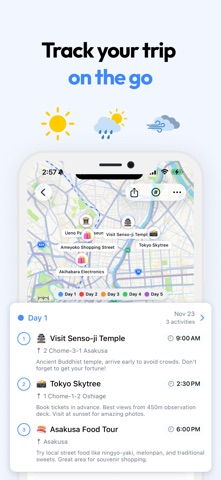
Wanderjoy puts your whole trip on one map. Tell it where you're going and when, and your personal AI itinerary planner drafts a day-by-day plan you can shape from there. Whether you already know exactly where you're headed or you're still just dreaming about it, it's a travel planner built to take the stress out of the planning part, and to keep every plan, note and packing list in one place. Visual Itinerary on a Map Everything you've planned sits on one map, with a pin for every stop and a route for every day. You can see at a glance how a day flows, notice when two stops are too far apart, and move things around until it feels right. It works the same for a weekend city break, a two-week vacation, or a road trip with a stop in every town. AI-Powered Suggestions Tell the planner your destination, your dates and how you like to travel, and it drafts a day-by-day plan with local highlights, a few hidden gems and the must-see sights. If a friend already made a plan you like, import their shared itinerary with a trip code and make it your own. Fully Flexible Planning Nothing is locked in. Add, edit or reorder activities whenever plans change, switch days around, update your route, and keep your trip notes next to the plan so the small details (the booking reference, the name of that bakery) don't get lost. No spreadsheets, no clunky lists. Packing List, Countdown and Reminders Before you go, there's a packing checklist tailored to your destination and its weather, and a countdown to departure. Once you're there, optional daily reminders keep the day's plan in front of you. Your itinerary works offline too, so it's still there when the signal isn't. Share and Collaborate Export your itinerary as a snapshot to send or post, or share a private link or trip code so the people traveling with you can see the plan and add to it. Who It's For Solo travelers, couples, families and groups, and anyone who'd rather have a holiday planner do the organizing so the trip itself gets more of the attention. We hope it makes your next trip a little easier to plan and a lot easier to enjoy. Some features require a subscription. See in-app purchase options for details. Terms of Use: https://www.apple.com/legal/internet-services/itunes/dev/stdeula/

Screenshots

Reviews

  • What Happened?

    1
    By MezzoLuzmo
    I can’t get any plans to work. I keep getting an “Oops” message.
  • Good

    5
    By Rachel_luong
    Excellent app
  • Get this

    5
    By Alayla12345
    THIS IS SOO GREAT TRY IT TRY IT NOW 😛😛😛
  • Perfect Planner!

    5
    By Isis Burgos
    This app literally hit everything on my bucket list and made it very easy to follow. 10/10
  • Very slow

    1
    By sxmcxm
    I was initially really excited to use this app and felt that the features were worth buying it, however the app is extremely slow and lags a lot, making it difficult to add / edit activities during your trip.
  • Love this app!

    5
    By Austin Lee1030
    This app made my day! I was planning on going to Tokyo and found this app. So smooth to you and planned my trip for me in seconds! What I like most this that I can view my plans offline as well! Edit: I asked for an intelligent ‘add activity’ feature and the developer answered to my wish within a week! Recommend!
  • Could be better. Don’t feel it is worth the subscription cost

    2
    By im14pinball
    I had it plan me a day trip to Pigeon Forge TN. It planned me breakfast at 8:30a, then go to Dollywood at 10am then leave the park at Noon for Lunch. So Dollywood is an amusement park. Not somewhere you just go for 2 hours and leave. It should know it’s an amusement park and is a whole day event. Another thing, it should allow you to set a budget, or at least give you an idea how much your day is going to cost. A few of the lunch and dinner recommendations are not cheap, plus it had me going to the titanic museum, and comedy barn the same day. So my single day itinerary would cost well over $300. Dollywood alone is over $100. You can delete items if you want but there is no option to have it insert something in its place. It should allow you to have AI add you a replacement, you can only manually add a replacement, but if you are in an unfamiliar place, this is difficult to do. You essentially get one shot at AI creating the plan, if you don’t like anything, you have to manually fix it instead of having AI create something else. I don’t see the value here. You can do the same thing with ChatGPT, but with ChatGPT, if I don’t like something, I can have it change that specific thing while leaving everything else. Or if I needed 6 hours at Dollywood, it would create me a new day to accommodate that. Save your money, use ChatGPT instead. If they fix these issues, maybe. Until then. Not worth the cost.
  • Not much use…

    1
    By BlueHose
    Trying to plan a 3 week road trip through 5 or 6 states (U.S.A.). This app seems to only be useful if traveling to and staying in just one city. I tried entering the first city along the trip…which is just an overnight hotel stay. I typed the city and state…it sent me to another city by the same name but in a different state. Also have not seen a way to convert temperature from Celcius to Fahrenheit. Maybe I'm missing something?

Comments

keyboard_arrow_up