FlipaClip: Draw 2D Animation

FlipaClip: Draw 2D Animation

By Visual Blasters LLC

  • Category: Graphics & Design
  • Release Date: 2017-03-04
  • Current Version: 5.0.2
  • Adult Rating: 4+
  • File Size: 237.27 MB
  • Developer: Visual Blasters LLC
  • Compatibility: Requires iOS 15.0 or later.
Score: 4.59926
4.59926
From 268,299 Ratings

Description

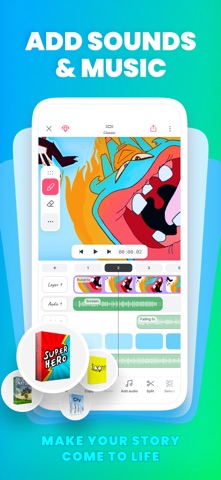
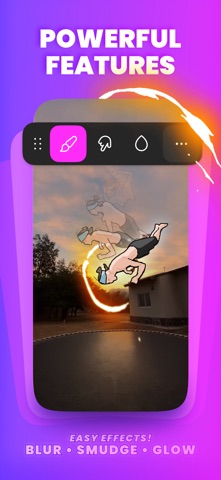
Make animations you're proud to share with FlipaClip, the powerful animation app with a super simple interface. DISCOVER YOUR UNIQUE ANIMATION STYLE Whether it's your first sketch or you have been animating for years, FlipaClip gives aspiring and emerging artists the tools to go further than ever before. The latest version was built with our community, and it's the beginning of a bigger evolution. WHAT’S NEW IN THE LATEST VERSION • Two Layouts, Your Call: Keep the familiar Classic layout for drawing, or open Studio to see every layer and audio track at once. Switch any time, and your project stays exactly the same. • New Timeline: See your drawings, frames, images, videos, and sound together in one view, and adjust timing and order in one place. • Frame Controls: Drag a frame to hold a drawing for as long as you need, without copying it again and again. • A First Look at Groups: Group frames, then stretch the group to repeat or loop it. Hold a pose or a background for any length in one move. • Draw Outside the Canvas: Keep sketches, references, and spare parts just outside the frame, right where you need them. • Undo Everything: Undo now reaches your whole project, even a deleted frame or layer, so you can try the risky idea. • Faster & Lighter: Everything's quicker, and your projects take up less room on your device. EASY TUTORIALS • Learn with guided how-to content and get inspired: Access tutorials and join our community for inspiration and guidance. POWERFUL AND INTUITIVE ANIMATION TOOLS • Art Tools: Use a variety of brushes, lasso, fill, eraser, ruler, mirror tool, and text. Draw on custom canvas sizes with Apple Pencil support. • Animation Layers: Animate like a pro with 3 free layers, or unlimited layers with FlipaClip Plus. Try blending modes, clipping masks, alpha lock, glow effect and Pixel Effect for free. • Add Audio: Add sound effects, voiceovers, and music tracks. Edit your sound right on the timeline in the Studio layout. Record your own voice for dialogue and import personal audio files. Explore our curated sound effects packages, or type your dialogue and pick a character voice with Voice Maker. • Blur & Smudge Tools: Soften and blend your drawings. • Magic Cut AI Tool: Cut out any image with AI. FRAME-BY-FRAME ANIMATION MADE SIMPLE • Onion Skin: See the frames before and after the one you're drawing. • Scrubber: Move through your animation to check the timing as you go. • Overlay Grid: Align and frame your drawings accurately. PERSONALIZED EXPERIENCE • Dark and Light Mode: Customize your app's appearance. • Organize Projects: Stack projects and manage them efficiently. • Move Your Tools: Move the draw tools bar around the stage to free up drawing space. • Drag & Rearrange Tools: Customize your layout by dragging and rearranging tool icons for the perfect setup. CREATORS MAKING ALL KINDS OF ANIMATION STYLES Creators use FlipaClip for cartoons, memes, anime, stick figures, stop motion, Gacha, fan art, music videos, animals, and gaming characters. COMMUNITY AND SHARING • Join a Thriving Community: Share your animations with a global audience. • Participate in Challenges: Win exciting prizes in various contests. • Social Media Integration: Post directly to TikTok and YouTube, or share anywhere else from your device. INSERT PHOTOS & VIDEOS • Animate on top of images or videos: Trace over video footage, sync your animation to its sound, and drop images onto your canvas. SAVE AND SHARE • Multiple Export Options: Save your work as MP4 or GIF, or as a PNG sequence with FlipaClip Plus. WATCH ANIMATED SHORTS • Streaming Feature: Enjoy a selection of curated animated short movies created by our community. Join millions of FlipaClip creators and share your unique animated stories. SUPPORT AND COMMUNITY • Website: www.flipaclip.com • Support: support.flipaclip.com • Discord: discord.com/invite/flipaclip Terms of Use (EULA): https://www.apple.com/legal/internet-services/itunes/dev/stdeula/
Screenshots

Reviews

  • What The Hell?

    3
    By - Bicker
    Ok, I love FlipaClip and I’ve been using it a lot recently. so now how come whenever I leave the app for a second the frame I was on turns pure pink? I can’t even undo it, I have to delete the frame and remake it. It’s been really annoying.
  • What the heck, this game is the best mobile animation app.

    5
    By Demel Willis.
    First off, YOU DONT GET AN AD AFTER ONE SeCOND, you also get to animate in multiple ways, as a Jjk fan, I am a huge fan of FlipaClip FIVE STAR!
  • FilpaClip

    5
    By Oqoaixjxjjzjzkzkz
    I love FlipaClip.
  • STOP WITH THE SUBSCRIPTIONS

    2
    By Iamforcedtoputanickname
    Listen, I understand that you need to make money, but I really really just want the video feature without paying daily for it. What happened to the ads? Plus, we only get 3 layers and have to pay for more. 4/10, turned into straight slop after a few years
  • Things I like and don’t

    4
    By Lajjshjdcvf
    I do enjoy SOME new updates but I enjoyed the last version more it was easier for me to understand I just ask if you could let us choose between the new and old version but if we do pick keep them similair to eachother?
  • Why?

    1
    By Idk4827
    Why do you have to put subscriptions and micro transactions in an animation app I shouldn’t have to pay to be creative
  • Error

    4
    By fix the advertisements
    We got FlipaClip plus but the features just don’t work
  • your update sucks

    2
    By baguette :)
    we dont need any more updates bro. its already trash and you made it worse bro js put it back the way it was before. you made it harder to use.
  • Why.

    1
    By T&F&SpcFan
    Unfortunately If the plus subscription was cheaper I would be fine:(
  • I WOULD rate this app 4/5 stars, but I need someone to see this…

    5
    By IbenamedBrooksE.Mayer
    You see, I LOVE FlipaClip, mainly because it’s one of the few good animation apps that support mobile devices, which I have. I visit FlipaClip daily, being the autistic 12-year old I am, but I have a few problems with the app that kinda kill my mood and go do something else: 1.) The style, location of buttons, and copy/paste mechanics change every year or so. Being #1 on this review, I find this the biggest problem for me, because I struggle to get used to using the same things I NORMALLY use for my animations when the buttons are in different locations. If the developers end up seeing this review, please explain why you all keep changing all that and what purpose it serves. (Please 🙏) 2.) Half the time I try to upload a photo or something else to my animations there’s an add. I know that’s likely because companies want people to start listening to their games and products and businesses, but too many of them can get quite annoying. Plus, I’ve seen some adds elsewhere that are either too cursed or too inappropriate, or sometimes even both at the same TIME. Luckily, I haven’t experienced anything on here yet, but make sure you verify with other companies if they want to put some of their adds in this app, just in case those adds contain anything not children-appropriate. Okay, so I only have two things I want to be fixed, and I suppose I COULD live with the adds now that I’m old enough, but, developers, please please PLEASE stop changing the position of buttons and all that. It gets really annoying and makes me want to just watch YouTube videos all day. When it comes to making my animations, this app and InShot go hand-and-and for me, so PLEASE don’t make me start using ONLY InShot. PLEASE!

Comments

keyboard_arrow_up