Authenticator App

Authenticator App

By 2Stable

  • Category: Productivity
  • Release Date: 2020-11-18
  • Current Version: 4.0.9
  • Adult Rating: 4+
  • File Size: 251.44 MB
  • Developer: 2Stable
  • Compatibility: Requires iOS 15.0 or later.
Score: 4.63971
4.63971
From 49,425 Ratings

Description

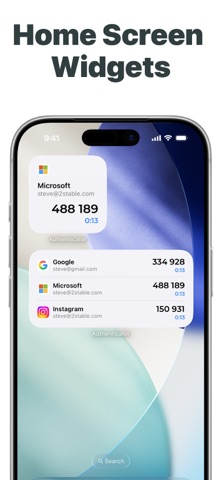
Authenticator App helps you keep your online accounts safe by giving you secure two-factor authentication codes for all your accounts. Key Features of the Authenticator App: - Secure & Private Encryption Your data is always encrypted, even in iCloud. Only you have access to your two-factor authentication data. - Encrypted Backup Create an encrypted backup of your codes to ensure seamless recovery in case you lose or upgrade your device. - Automatic Synchronization Across Apple Devices Enjoy real-time synchronization of your accounts across all your Apple devices, including iPhone, iPad, Mac and Apple Watch. - Groups Organize your accounts into groups for a cleaner setup. Share your groups with others and control access with flexible permissions. - Quick Access with Widget Access your 2FA codes instantly from the Home Screen with the Authenticator Widget, providing faster authentication. - Offline Two-Factor Authentication Generate secure codes even when your device is offline or in airplane mode. Your accounts remain protected no matter your connection status. - Multi Import Easily import accounts and 2FA codes from other authenticators like Google Authenticator, password managers, and files. - Native Apple Experience Enjoy a seamless experience on all Apple devices, with features like dark mode, intuitive gestures, and automatic data sync. - All Popular Accounts Authenticator App supports major platforms like Microsoft, Google, Facebook, Amazon, Instagram, Coinbase, Roblox, and thousands more. It’s the perfect solution whether you’re looking for an Authenticator App for Microsoft, an Authenticator App for Facebook, or an Authentication App for Instagram. - We’re Here to Help We constantly improve our app, don't hesitate to contact us at support@2stable.com to request a missing feature or an improvement. ---------------------------------------------------------------------------------------------------------------- Payment will be charged to iTunes Account at confirmation of purchase. Subscription automatically renews unless auto-renew is turned off at least 24-hours before the end of the current period. Account will be charged for renewal within 24-hours prior to the end of the current period. You can turn off auto-renew up to 24 hours before your next subscription payment is due via your App Store settings page. Subscriptions may be managed by the user and auto-renewal may be turned off by going to the user's Account Settings after purchase. Links Terms of Service: https://authenticator.2stable.com/terms-of-service/ Privacy: https://authenticator.2stable.com/privacy-policy/

Screenshots

Reviews

  • Don’t get this if you want to keep your 2fa codes when changing phones

    1
    By Seraphim03
    This app is horrid it locks backups behind a paywall and hides it so that you don’t even realize it is behind a paywall then when you switch to a new device without realizing it you just lost access to a bunch of your accounts
  • Scam

    1
    By Guamshcbc
    Why in the world would I PAY to use an authenticator. The iPhone app doesn’t make you pay they’re clearly money hungry
  • This app is great

    5
    By ReallyLiam
    So I been using this for quite some time and I had no problem whatsoever
  • Love Auth App

    5
    By Sidequestgremlin
    I have been using this app for over 5 years and continue to love it to this day. I like that you can have this Auth on all of my devices. I am aware that it is less secure than an Auth that lives only on my phone, I believe the convenience is worth the extra “risk”.
  • Expensive - and price not revealed

    2
    By mr.oakes.afmc
    This looks like a good app, although one discovers only after using it that it is limited to TWO (yes only two) codes. Upgrading costs $50/year. That is a lot when I already have several authenticator apps from Google, RSA, and others. Nor is it clear whether one pays again for use on multiple platforms, like a MacBook, iPad, iPhone. Nor is it clear whether there is a Linux version.
  • Good app but...

    3
    By mrCrit
    The annoying nag for entering the password while I've already just biometrically signed in is an needed and unwanted extra step. Make it optional in the settings, please.
  • Very difficult to download or use

    1
    By PrayingSenior
    I renewed again Microsoft, but the new update messed up my family setup. Now I cannot download Authenticator on the Mac Air, nor can If figure out how to make it work with the accounts it was connected with before. I have multiple devices. Microsoft asks for it so many times and have lost access to some legitimate emails until they could be verified in some other way. I am trying to stick with Word, Drive, Outlook, etc, but it is becoming harder to manage the environment without having to sign in all the time or not being able to smoothly view/edit files from one device or family account to another without constant logins and authentication. Please provide an easier way to authenticate or suggest another authenticator application that Microsoft will accept instead of the Native one . It is my primary word app for now, so I need the access. Thank you.
  • i have a nee question about coded dr y

    5
    By rustysf
    yoy lg n
  • New Update, Random Crashes

    1
    By Ashmurshed
    After updating, my app will literally pop open, then jut crash. I have an m5 mba and only crashes on this computer.
  • Customer Service

    4
    By BudJens1
    I ran into a problem after a recent update, 4.0.6(4934), in that the app would crash after I entered my password or did facial authentication. open. iMac 2024 M4, macOS 26.5.2.

Comments

keyboard_arrow_up