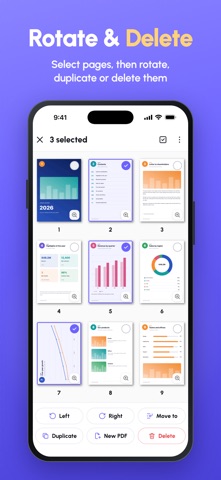

Reorder PDF Pages lets you rearrange, rotate, delete and extract PDF pages right on your iPhone and iPad. Open a PDF, put the pages in the right order, fix sideways scans, remove the pages you don't need and save a clean new PDF in seconds. No sign-up, no watermark, and your files are processed on your device. REORDER & REARRANGE PDF PAGES • Long-press and drag any page to a new place • Move to: send selected pages before or after any page, or to the start or the end. Handy for long PDFs where dragging takes too long • Reverse the page order in one tap • Undo any step, or Reset to the original order ORGANIZE PDF PAGES • Rotate pages left or right to fix sideways or upside-down scans • Delete pages you don't need, with Undo if you change your mind • Duplicate pages • Add a blank page anywhere • Extract chosen pages into a new PDF SELECT PAGES FAST • Tap pages to select them • Select all, odd pages or even pages in one tap • Rotate, delete, move or extract many pages at once SEE EVERY PAGE CLEARLY • Page grid with 2, 3 or 4 columns (more columns on iPad) • Big page preview: swipe through pages and rotate, duplicate or delete them right there • PDF viewer with smooth scrolling, pinch zoom and a page counter BUILT FOR BIG FILES • Tested with a 1,000-page PDF and a 290 MB scanned PDF • Saving shows progress (page x of n) and can be cancelled at any time ALL YOUR SAVED PDFS IN ONE PLACE • Every PDF you create is listed in Saved PDFs, with a tag showing what was done: Reordered, Rotated, Pages removed, New PDF or Edited • See the size and time of each file • Search and sort your saved PDFs • Open, edit pages again, share, rename or delete (with Undo) • Export a copy to the Files app or share it to other apps QUICK TOOLS ON THE HOME SCREEN Choose a PDF, or jump straight to Reorder, Rotate, Delete or Extract. GREAT FOR • Scanned documents that came out in the wrong order • School and college assignments, notes and worksheets • Forms, applications and contracts before you send them • Reports, invoices and presentations • Cleaning up blank or extra pages from a scan WHY REORDER PDF PAGES • Free PDF page organizer with simple, clear controls • No account and no sign-up • No watermark on your saved PDFs • Your original file stays untouched: changes are saved as a new PDF • Pages are processed on your iPhone or iPad, not uploaded to a server How to reorder PDF pages: 1. Tap Choose PDF and pick your file from Files 2. Drag pages, or select them and use Move to 3. Rotate, delete, duplicate or extract pages if needed 4. Tap Save to get your new PDF Download Reorder PDF Pages and rearrange your PDF pages the way you want.